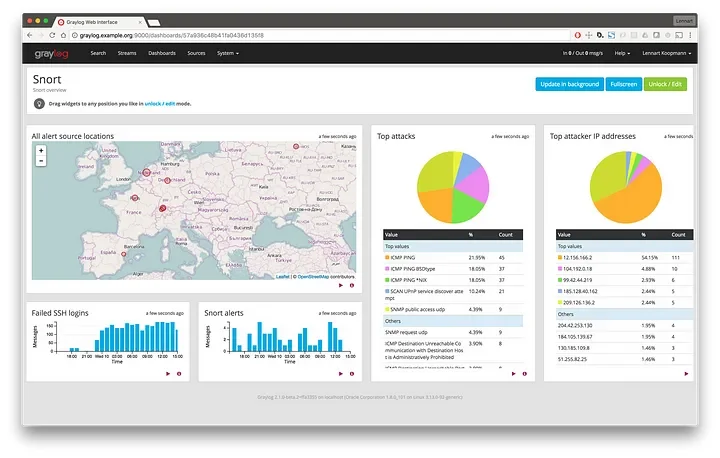
Log management solutions like Graylog gather and store log files from various sources in a single, centralized location. This additional capability allows your team to gain deeper insight and faster access to all relevant data when investigating possible threats or determining prevention methods for future security issues. Host-based IDS like OSSEC can perform detection of rootkits, file integrity check, failed logins, etc. Network IDS like Snort is able to detect Nmap scans, DoS attempts, Bad traffic, etc. Snoopy Logger is a small utility to record commands ran on the system (just for audit). Nxlog will forward our logs over the network. Graylog will also be triggering alerts and sending emails (also charts and stuff).
Guide Sections
- Ansible Playbooks
- Manual Configuration
- — OSSEC (Host-based IDS)
- — Snort (Network-level IDS)
- — Nxlog (Log forwarder)
- — Snoopy (Command history)
- Graylog Configuration
Ansible Playbooks
Be a DevOps and just use Ansible to save time. For Ubuntu/Debian based systems use this Ansible.

Manual Configuration
If for some reason you can’t run ansible or just want to make your life difficult you can find the manual configuration down below for all the four tools.
1. OSSEC (Host-based IDS)

OSSEC is a free, open-source host-based intrusion detection system. It performs log analysis, integrity checking, Windows registry monitoring, rootkit detection, time-based alerting, and active response.
Prerequisites for OSSEC
These packages are needed for OSSEC.
yum install -y gcc, inotify-tools, bind-utils, wget, python2-pip, python3-pip
Python Dependencies
Python dependency for OSSEC
Download package v2.9.3
Get the latest package from their website
wget -O /opt/ossec-hids-2.9.3.tar.gz https://github.com/ossec/ossec-hids/archive/2.9.3.tar.gz && tar xvf ossec-hids-2.9.3.tar.gz
Install in local mode
Choose the install type as local. Don’t activate email alerts, rest is default mostly.
/opt/ossec-hids-2.9.3/install.sh
Configure Syslog
Add a section above <global> directive. This will forward all output as syslog.
<syslog_output>
<server>1.1.1.1</server>
<port>5141</port>
<format>cef</format>
</syslog_output>
1.1.1.1 is the Graylog address, change accordingly.
Enable client-syslog service
/var/ossec/bin/ossec-control enable client-syslog
Start the service
/var/ossec/bin/ossec-control restart
2. Snort (Network-level IDS)

Snort is a free open source network intrusion detection system and intrusion prevention system created in 1998 by Martin Roesch, founder and former CTO of Sourcefire. Snort is now developed by Cisco, which purchased Sourcefire in 2013.
Prerequisites pacakges
yum install -y zlib-devel, libpcap-devel, pcre-devel, libdnet-devel, openssl-devel, libnghttp2-devel, luajit-devel
Download package v2.9.13–1
Get the latest version from their website or download from the link below.
wget -O /opt/snort-2.9.13-1.centos7.x86_64.rpm https://raw.githubusercontent.com/eszedkae/download/master/snort-2.9.13-1.centos7.x86_64.rpm
Install the package
yum -y --nogpgcheck localinstall /opt/snort-2.9.13-1.centos7.x86_64.rpm
Get the Community Rules
wget -O /opt/community-rules.tar.gz https://www.snort.org/downloads/community/community-rules.tar.gz && tar xvf /opt/community-rules.tar.gz
Get Emerging Rules
wget -O /opt/emerging.rules.tar.gz https://rules.emergingthreats.net/open/snort-2.9.0/emerging.rules.tar.gz && tar -xvzf /opt/emerging.rules.tar.gz
Copy the Rules
cp -r /opt/community-rules/*.rules /etc/snort/rules/ && cp -r /opt/rules/*.rules /etc/snort/rules/
Changes to Snort configuration file
Change the Network Address
ipvar HOME_NET [server_own_ip]/32
Include the community and emerging rules at the end section of rules.
include $RULE_PATH/community-rules/community.rules
include $RULE_PATH/emerging-activex.rules
include $RULE_PATH/emerging-attack_response.rules
include $RULE_PATH/emerging-botcc.portgrouped.rules
include $RULE_PATH/emerging-botcc.rules
include $RULE_PATH/emerging-chat.rules
include $RULE_PATH/emerging-ciarmy.rules
include $RULE_PATH/emerging-compromised.rules
include $RULE_PATH/emerging-current_events.rules
include $RULE_PATH/emerging-deleted.rules
include $RULE_PATH/emerging-dns.rules
include $RULE_PATH/emerging-dos.rules
include $RULE_PATH/emerging-drop.rules
include $RULE_PATH/emerging-dshield.rules
include $RULE_PATH/emerging-exploit.rules
include $RULE_PATH/emerging-ftp.rules
include $RULE_PATH/emerging-games.rules
include $RULE_PATH/emerging-icmp_info.rules
include $RULE_PATH/emerging-icmp.rules
include $RULE_PATH/emerging-imap.rules
include $RULE_PATH/emerging-inappropriate.rules
include $RULE_PATH/emerging-info.rules
include $RULE_PATH/emerging-malware.rules
include $RULE_PATH/emerging-misc.rules
include $RULE_PATH/emerging-mobile_malware.rules
include $RULE_PATH/emerging-netbios.rules
include $RULE_PATH/emerging-p2p.rules
include $RULE_PATH/emerging-policy.rules
include $RULE_PATH/emerging-pop3.rules
include $RULE_PATH/emerging-rpc.rules
include $RULE_PATH/emerging-scada.rules
include $RULE_PATH/emerging-scan.rules
include $RULE_PATH/emerging-shellcode.rules
include $RULE_PATH/emerging-smtp.rules
include $RULE_PATH/emerging-snmp.rules
include $RULE_PATH/emerging-sql.rules
include $RULE_PATH/emerging-telnet.rules
include $RULE_PATH/emerging-tftp.rules
include $RULE_PATH/emerging-tor.rules
include $RULE_PATH/emerging-trojan.rules
include $RULE_PATH/emerging-user_agents.rules
include $RULE_PATH/emerging-voip.rules
include $RULE_PATH/emerging-web_client.rules
include $RULE_PATH/emerging-web_server.rules
include $RULE_PATH/emerging-web_specific_apps.rules
include $RULE_PATH/emerging-worm.rules
Local Rule (Optional)
This will detect every icmp request, It is mostly for testing only. Paste the following in file /etc/snort/rules/local.rules
alert icmp any any -> $HOME_NET any (msg:”ICMP Packets”; sid:1000001; rev:1; classtyp e:icmp-event;)
Validate Settings
This will validate the current configuration to check for any errors.
snort -T -c /etc/snort/snort.conf
Change the Startup Script
Edit the file /etc/init.d/snortd and add the -A fast flag to enable simple alerts.
Start the Services
systemctl start snortd
systemctl status snortd -l
Troubleshooting Tips
Fixing paths for libdnet
ln -s /usr/lib64/libdnet.so.1.0.1 /usr/lib64/libdnet.1
Fix missing files
touch /etc/snort/rules/white_list.rules && touch /etc/snort/rules/black_list.rules && touch /usr/local/lib/snort_dynamic.rules && touch /etc/snort/rules/local.rules && touch /usr/local/lib/snort_dynamicrules
Fix the interface name in /etc/init.d/snortd
3. Nxlog (Log forwarder)
Download Nxlog Community Edition
Get the latest one from their website.
wget -O /opt/nxlog-ce-2.10.2150-1_rhel7.x86_64.rpm https://nxlog.co/system/files/products/files/348/nxlog-ce-2.10.2150-1_rhel7.x86_64.rpm
Install Nxlog
yum -y --nogpgcheck localinstall /opt/nxlog-ce-2.10.2150-1_rhel7.x86_64.rpm
Configuration changes
Edit the file /etc/nxlog.conf. 1.1.1.1 is Graylog address, So change accordingly.
########################################
# Global directives #
########################################
User nxlog
Group nxlog
LogFile /var/log/nxlog/nxlog.log
LogLevel INFO
<Extension multi>
Module xm_syslog
</Extension>
<Input in>
Module im_file
File "/var/log/snort/alert"
</Input>
<Output out>
Module om_tcp
Host 1.1.1.1
Port 5142
Exec to_syslog_ietf();
</Output>
########################################
# Routes #
########################################
<Route r>
Path in => out
</Route>
Start the Services
chkconfig nxlog on
service nxlog start
4. Snoopy (Command history)
Get the Package
Get the latest one from Git repo.
wget -O /opt/snoopy-2.2.6-3.fc24.x86_64.rpm http://download-ib01.fedoraproject.org/pub/fedora/linux/releases/30/Everything/x86_64/os/Packages/s/snoopy-2.2.6-3.fc24.x86_64.rpm
Installing Package
yum -y --nogpgcheck localinstall /opt/snoopy-2.2.6-3.fc24.x86_64.rpm
Forward via Syslog
Edit the file /etc/rsyslog.conf and insert the line at the end. This will send logs to Graylog in syslog format.
authpriv.* @1.1.1.1:5143;RSYSLOG_SyslogProtocol23Format
Enable Service
snoopy-enable
service restart rsyslog
Graylog Configuration
Create inputs for ossec, snort and snoopy in Graylog with following specs.
---OSSEC Input---
CEF UDP INPUT
PORT 5141
---Snort Input---
SYSLOG UDP INPUT
PORT 5142
---Snoopy Logger---
SYSLOG UDP INPUT
PORT 5143
Extractors for Snort Input
Import extractor and paste following JSON
{
"extractors": [
{
"condition_type": "regex",
"condition_value": "\\[\\d+:\\d+:\\d\\].*\\[Classification:.+\\]\\s\\[Priority:\\s\\d\\].*\\{\\S+\\}\\s\\S+:\\ d+\\s->\\s\\S+:\\d+",
"converters": [],
"cursor_strategy": "copy",
"extractor_config": {
"regex_value": "\\[\\d+:\\d+:\\d\\] (.*) \\[Classification:.+\\]\\s\\[Priority:\\s\\d\\].*\\{\\S+\\}\\s\\S +:\\d+\\s->\\s\\S+:\\d+"
},
"extractor_type": "regex",
"order": 15,
"source_field": "message",
"target_field": "snort_message",
"title": "Snort Message"
},
{
"condition_type": "regex",
"condition_value": "\\[\\d+:\\d+:\\d\\].*\\[Classification:.+\\]\\s\\[Priority:\\s\\d\\].*\\{\\S+\\}\\s\\S+:\\ d+\\s->\\s\\S+:\\d+",
"converters": [],
"cursor_strategy": "copy",
"extractor_config": {
"regex_value": "\\[\\d+:\\d+:\\d\\].*\\[Classification:(.+)\\]\\s\\[Priority:\\s\\d\\].*\\{\\S+\\}\\s\\S+: \\d+\\s->\\s\\S+:\\d+"
},
"extractor_type": "regex",
"order": 16,
"source_field": "message",
"target_field": "snort_classification",
"title": "Snort Classification"
},
{
"condition_type": "regex",
"condition_value": "\\[\\d+:\\d+:\\d\\].*\\[Classification:.+\\]\\s\\[Priority:\\s\\d\\].*\\{\\S+\\}\\s\\S+:\\ d+\\s->\\s\\S+:\\d+",
"converters": [],
"cursor_strategy": "copy",
"extractor_config": {
"regex_value": "\\[\\d+:\\d+:\\d\\].*\\[Classification:.+\\]\\s\\[Priority:\\s(\\d)\\].*\\{\\S+\\}\\s\\S+: \\d+\\s->\\s\\S+:\\d+"
},
"extractor_type": "regex",
"order": 17,
"source_field": "message",
"target_field": "snort_priority",
"title": "Snort Priority"
},
{
"condition_type": "regex",
"condition_value": "\\[\\d+:\\d+:\\d\\].*\\[Classification:.+\\]\\s\\[Priority:\\s\\d\\].*\\{\\S+\\}\\s\\S+:\\ d+\\s->\\s\\S+:\\d+",
"converters": [],
"cursor_strategy": "copy",
"extractor_config": {
"regex_value": "\\[\\d+:\\d+:\\d\\].*\\[Classification:.+\\]\\s\\[Priority:\\s\\d\\].*\\{(\\S+)\\}\\s\\S+: \\d+\\s->\\s\\S+:\\d+"
},
"extractor_type": "regex",
"order": 18,
"source_field": "message",
"target_field": "snort_protocol",
"title": "Snort Protocol"
},
{
"condition_type": "regex",
"condition_value": "\\[\\d+:\\d+:\\d\\].*\\[Classification:.+\\]\\s\\[Priority:\\s\\d\\].*\\{\\S+\\}\\s\\S+:\\ d+\\s->\\s\\S+:\\d+",
"converters": [],
"cursor_strategy": "copy",
"extractor_config": {
"regex_value": "\\[\\d+:\\d+:\\d\\].*\\[Classification:.+\\]\\s\\[Priority:\\s\\d\\].*\\{\\S+\\}\\s(\\S+): \\d+\\s->\\s\\S+:\\d+"
},
"extractor_type": "regex",
"order": 19,
"source_field": "message",
"target_field": "src_ip",
"title": "Snort Source IP"
},
{
"condition_type": "regex",
"condition_value": "\\[\\d+:\\d+:\\d\\].*\\[Classification:.+\\]\\s\\[Priority:\\s\\d\\].*\\{\\S+\\}\\s\\S+:\\ d+\\s->\\s\\S+:\\d+",
"converters": [],
"cursor_strategy": "copy",
"extractor_config": {
"regex_value": "\\[\\d+:\\d+:\\d\\].*\\[Classification:.+\\]\\s\\[Priority:\\s\\d\\].*\\{\\S+\\}\\s\\S+:\\ d+\\s->\\s(\\S+):\\d+"
},
"extractor_type": "regex",
"order": 19,
"source_field": "message",
"target_field": "dst_ip",
"title": "Snort Destination IP"
}
],
"version": "0.20.3.jlh"
}
Alerts & Conditions Configuration
Attempted Information Leak
Field snort_classification must match exactly Attempted Information Leak
Integrity checksum changed
Field name must match exactly Integrity checksum changed.
Potentially Bad Traffic
Field snort_classification must match exactly Potentially Bad Traffic
Email Alerts Configuration
vi /etc/graylog/server/server.conf
Change the configuration accordingly.
transport_email_enabled = true
transport_email_protocol = smtp
transport_email_hostname = smtp.gmail.com
transport_email_port = 587
transport_email_use_auth = true
transport_email_use_tls = true
transport_email_use_ssl = false
transport_email_auth_password = <password123>
transport_email_subject_prefix = [graylog3]
transport_email_from_name = Graylog Server
Restart the graylog server
systemctl graylog-server restart

 Jan 18, 2025
 6 min read




Comments (0)
Leave a Reply
Log in to post a comment.